


There are two ways to run Instagram ads. The first is to boost a post straight from the app. The second is to build a campaign in Meta’s Ads Manager. The first takes a few minutes. However, the second gives you far more control over audience, placements and tracking. In this post, we walk through both, step by step. We also cover budget, review time and the most common mistakes.
Let us run your Instagram ads
We are an agency based in Ankara. We set up the Meta ad account and make the ad visuals and Reels. Then we run the campaign and report on it. We quote the fee based on the scope. If you’d rather not deal with ads yourself, get a quote.
In short
24 hours
review time for most ads (Meta)
5%
Meta’s location fee in Turkey (2026)
30%
Apple fee when adding funds on iPhone
First, switch your account to a professional account. To do this, set the account type to business or creator in Settings. Meta’s boosting requirements don’t include a follower count.
Second, add a payment method. Boosting for the first time? Then you don’t need a Facebook Page or a Meta ad account. However, Meta recommends connecting an ad account. That’s because it unlocks tools such as saved audiences. These details are on Instagram’s page on boosting a post.
Finally, if your business is in healthcare, read the rules first. Clinics in Turkey face extra limits on ads. We cover them in our post on healthcare promotion rules.
This way turns a post you’ve already shared into an ad. As a result, boosted posts can appear in the home feed, profile feed, Explore and Stories.
Next, the ad goes into review. Once it’s approved, it starts running and Instagram notifies you.
Watch out for the Apple fee on iPhone
According to Instagram, Apple may take a 30% service fee in most regions. This applies when you add funds to your ad account in the iPhone app. This fee goes to Apple, not Meta. To avoid it, boost the post from a computer on instagram.com.
Ads Manager is Meta’s tool for running Facebook and Instagram ads. Here, an ad has three levels: campaign, ad set and ad.
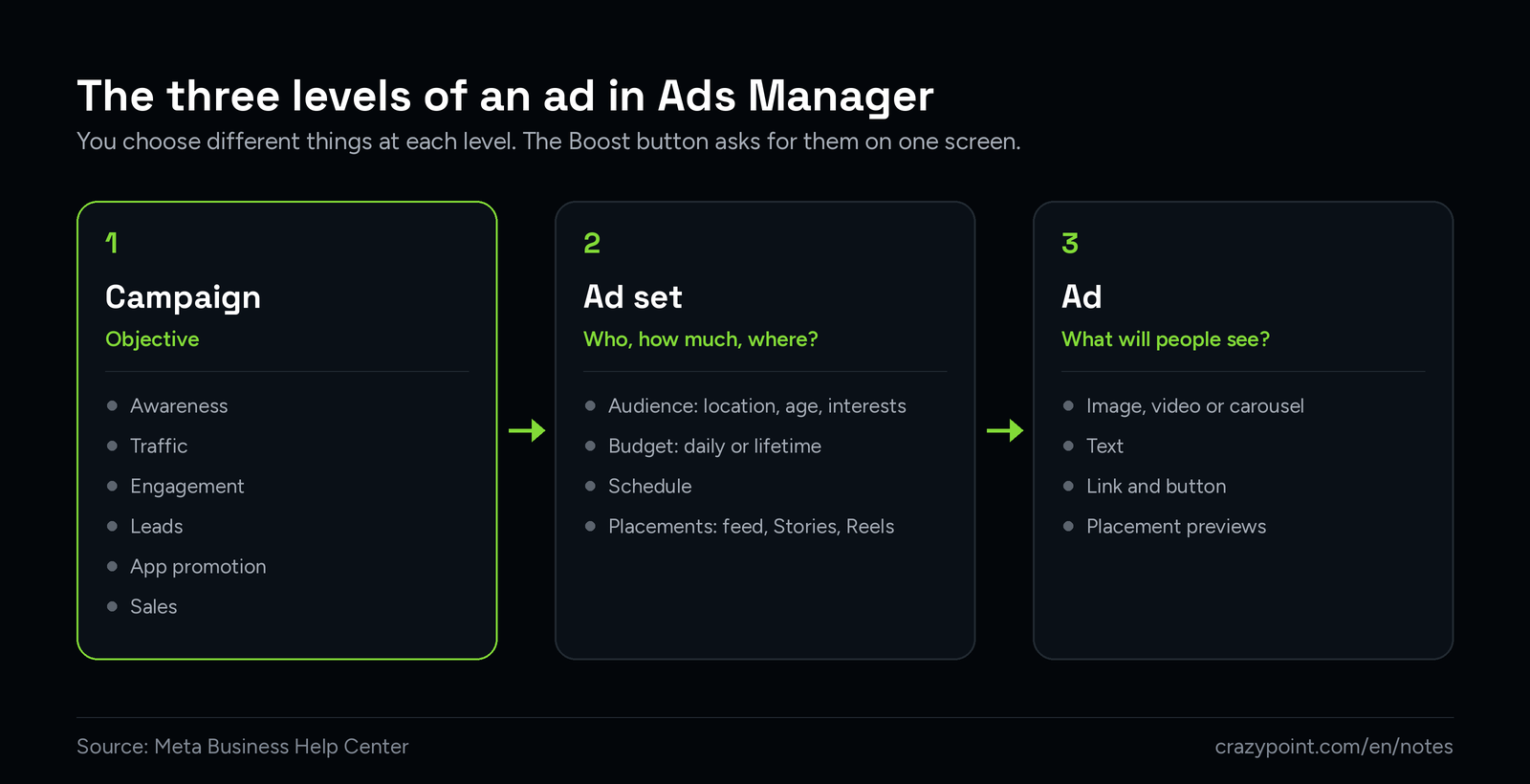
First, choose what the campaign is for. Meta offers six objectives: awareness, traffic, engagement, leads, app promotion and sales. For example, pick traffic if you want site visits. Pick leads if you want people to fill in a form.
Then decide who sees the ad, for how long and where. For the audience, you can choose location, age and interests. You can also set a daily or a lifetime budget.
For Instagram, placements include feed, Stories, Reels, Explore home, profile feed and search results. According to Meta, Explore feed is no longer a separate placement since January 2026. Instead, people who tap a post in Explore now move into a Reels view. So ads in the Reels placement show up there.
Next, build the ad itself. You can choose a single image, a video or a carousel. Add the text, the link and a button such as “Learn more”. Check the preview for each placement. That’s because vertical and square sizes are cropped differently.
Finally, click Publish. According to Meta’s page on ad review, most ads are reviewed within 24 hours. Sometimes it can take longer.
| Boost | Ads Manager | |
|---|---|---|
| Setup | A few minutes | Longer |
| Content | An existing post | A new ad or a post |
| Objectives | Limited | Six campaign objectives |
| Placements | Automatic | Can be chosen by hand |
| Tracking | Basic results | Pixel and conversion tracking |
| Best for | A quick test | Regular, measured ads |
In short, Boost is enough to show one post to more people. But if you want measured results such as sales or form fills, use Ads Manager.
Budget depends on your goal and the cost per result. For example, a form fill costs more than a profile visit. To work out a daily budget, use the formula in our post on Meta ads budget.
Also, your bill has other lines besides the ad budget. Since 1 July 2026, Meta charges a 5% location fee on ads shown to audiences in Turkey. If an agency runs the ads, its fee is separate too. We break down these three parts in our post on Meta ads management cost.
The account may not be a professional account. Or the post may not be eligible for boosting. So check the account type first.
The ad may break one of Meta’s advertising standards. Luckily, the notification tells you which one. So you can fix it and publish again, or request another review.
According to Meta, changing targeting, creative, optimization or billing event triggers a new review. However, changing the budget, bid or schedule doesn’t.
At CrazyPoint
Before we publish an ad, we check the visual, text and targeting against Meta’s rules.
According to Instagram, you have to delete the ad first. Open ad tools in your professional dashboard, delete the ad, then delete the post.
We are an agency based in Ankara. Ads, design and video are done by the same team. So you don’t need another company for the ad visual or the Reels video. The work moves in four steps:
We quote the ad management fee based on the scope. However, the ad budget is paid to Meta and isn’t part of this fee. Need a video shoot for the ad too? Shooting, editing and 3 rounds of revisions start at 15,000 TL + VAT.
There’s no follower requirement. In fact, Meta’s boosting requirements only ask for a professional account.
Yes. On your first boost, you don’t need a Facebook Page or a Meta ad account. However, to use Ads Manager you need a Meta ad account.
The ad is reviewed first. According to Meta, most ads are reviewed within 24 hours. Once approved, it starts on the date you chose.
The ad account and the page should be in your name. You only give the agency access. That way, the account and its history stay with you. This holds even if you leave the agency.
Let’s plan your Instagram ads
Tell us what you expect from the ads. Also tell us which product or service you want to promote. We will agree on the scope and send a written quote. For details, see our Meta Ads page.

Comments are closed