


Short answer: yes. AI crawlers from ChatGPT, Claude and Meta AI visit websites to answer people’s questions.
So instead of guessing, we measured. On the day our new site went live, we switched on the measurement feature of our own plugin, CrazyPoint SEO. Soon the crawlers started to arrive. This post covers who came, what they read and what it means for site owners.
In short
Counting started on the afternoon of 21 October 2026. By the next evening, 516 requests had arrived. Most of them came from just three crawlers.
516
AI crawler requests in total
189
Meta · meta-externalagent
155
OpenAI · GPTBot
146
Anthropic · ClaudeBot
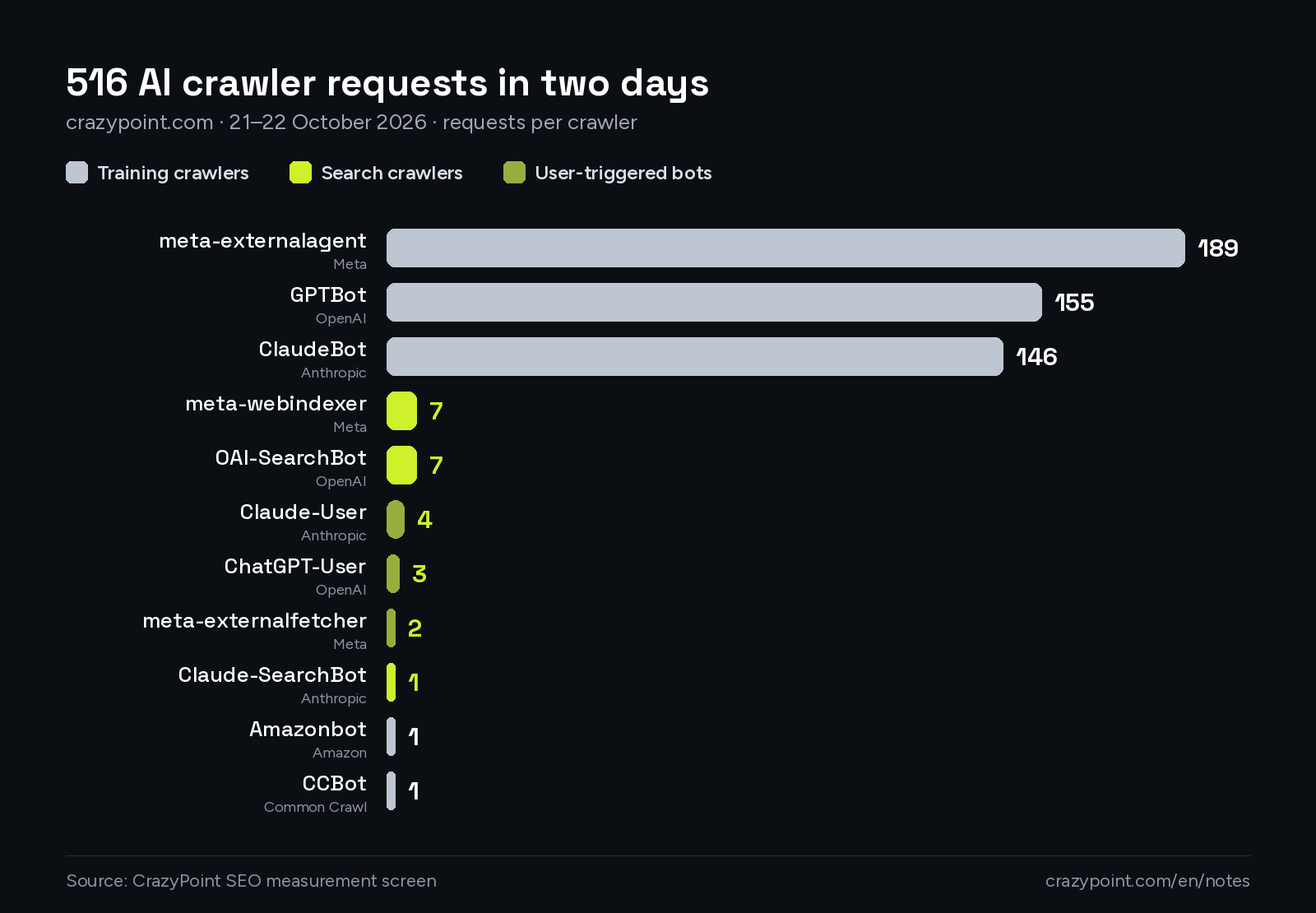
Of the remaining 26 requests, 24 came from a smaller but more valuable group: search crawlers and bots that open a page on behalf of a user. The last 2 came from the Amazon and Common Crawl crawlers.
No. AI crawlers fall into three groups, and each group affects your site differently.
| Group | Example crawlers | What does it do? | On our site in 2 days |
|---|---|---|---|
| Training crawlers | GPTBot, ClaudeBot, meta-externalagent, CCBot | Collect content for future models. They do not send visitors directly. | 492 requests |
| Search crawlers | OAI-SearchBot, Claude-SearchBot, meta-webindexer | Index the pages that AI answers can cite as sources. | 15 requests |
| User-triggered bots | ChatGPT-User, Claude-User, meta-externalfetcher | Open a page at the moment someone asks about your link. | 9 requests |
Training crawlers do not bring visitors directly. Still, your brand name and what you do can become part of a model’s general knowledge. The number of search crawler visits is normal for a new site, and we expect it to grow as the site gets known.
Each of those 9 user-triggered requests is the trace of a real person who asked an AI about our link.
The companies behind these crawlers explain the difference too. For example, OpenAI, Anthropic and Meta each list their crawlers and what they are for.
The crawlers did not wander at random. In a single day, GPTBot read all 16 of our Turkish project pages. It also went through 6 service pages and 11 English app pages. Meta’s crawler took a similar tour. On top of that, the crawlers asked for the sitemap 25 times.
We took two lessons from this. First, a clean sitemap shows crawlers the way. Second, the two-language structure works, because the English pages got as much attention as the Turkish ones.
Crawlers also try old addresses, not only today’s pages.
87
“not found” (404) responses
179
redirects to a new address (301)
54 / 54
sitemap addresses working fine
These old addresses most likely come from links to the previous site and the staging address. First, we checked our side. Then we opened all 54 addresses in the sitemap one by one, and every one of them worked. Redirects are harmless: the crawler arrives at the old address and is sent on to the new one.
So when you rebuild your site, remember to redirect important old addresses to the new pages. Otherwise crawlers and visitors land on an empty page.
It depends on what you want. Blocking each group has a different result.
| If you block | What happens? |
|---|---|
| Search crawlers | Tools like ChatGPT find it harder to cite you as a source. |
| User-triggered bots | When someone asks about your link, the AI cannot open your page. |
| Training crawlers | Your content is not used to train models. According to the companies, this does not affect your search visibility. |
Our choice is to keep them all open, because as an agency we want our name and our work to be known.
Also, some security and CDN services block these crawlers by default. That is why we suggest you check your own settings once.
Every number in this post comes from the measurement screen of the CrazyPoint SEO plugin. We use the plugin on our own site first.
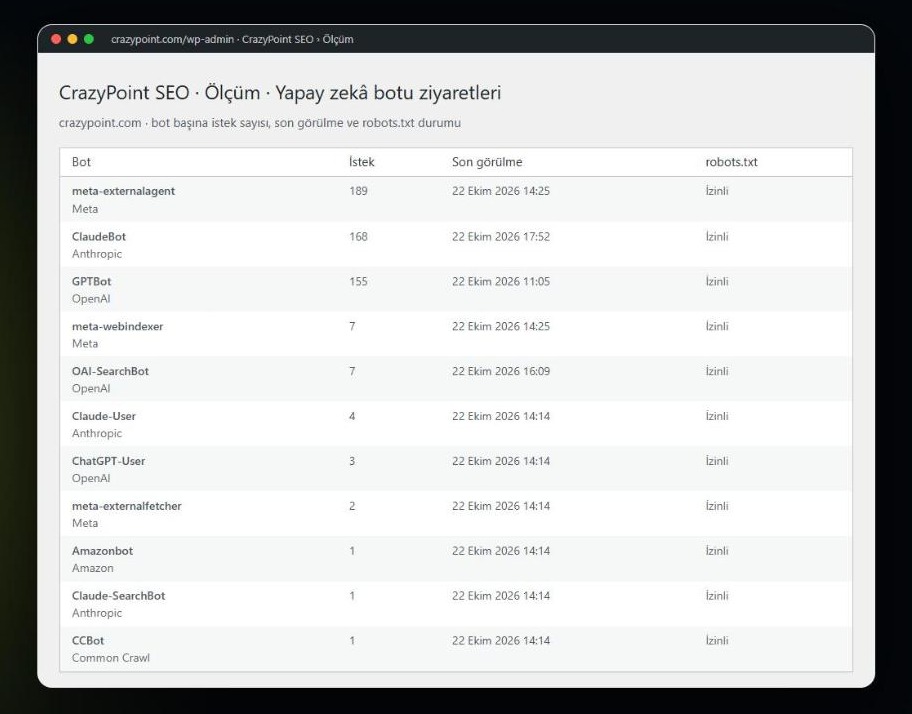
For AI visibility, it brings these jobs together in one place:
Manages search crawlers and training crawlers as two separate groups, then writes your choice to robots.txt.
Counts crawler requests by day, crawler and address. It stores no IP addresses, cookies or personal data.
Finds problems that could stop a page from showing up in search. On our site, all 72 items came out clean.
Presents organisation, page and post details in a format search engines understand, without contradicting what the page says.
Offers a plain-text summary of the site and its key pages for AI tools.
Tells Bing and Yandex right away when a page is published or changed.
Of course, no plugin can guarantee that a site will appear in AI answers. Search engines and AI tools make that call. However, removing the technical barriers is the first step on that road.
You can start with these five checks:
Let’s review your site for AI search together
We can set up the same things we did on our own site for yours. For details, see our CrazyPoint SEO and Web and App Development pages.

Comments are closed