


Search for “ad agency in Ankara” or “dentist near me”, and the map comes first. And the way onto that map is a Google Business Profile. The profile is free and takes a few steps to set up. However, one small mistake can get it suspended. Below, we set up a Google Business Profile in 7 steps. We also cover verification and common mistakes.
Let us set up your profile
We prepare the category, description, services, photos and first posts. We also show you, step by step, what to do for verification. The profile is part of our local SEO work. Tell us about your business, and we will send a quote.
In short
750
character limit for the description
20
maximum service areas
5 business days
longest wait for a video review
3
local ranking factors
The steps are based on Google’s sign-up page for Business Profile. The order stays roughly the same.
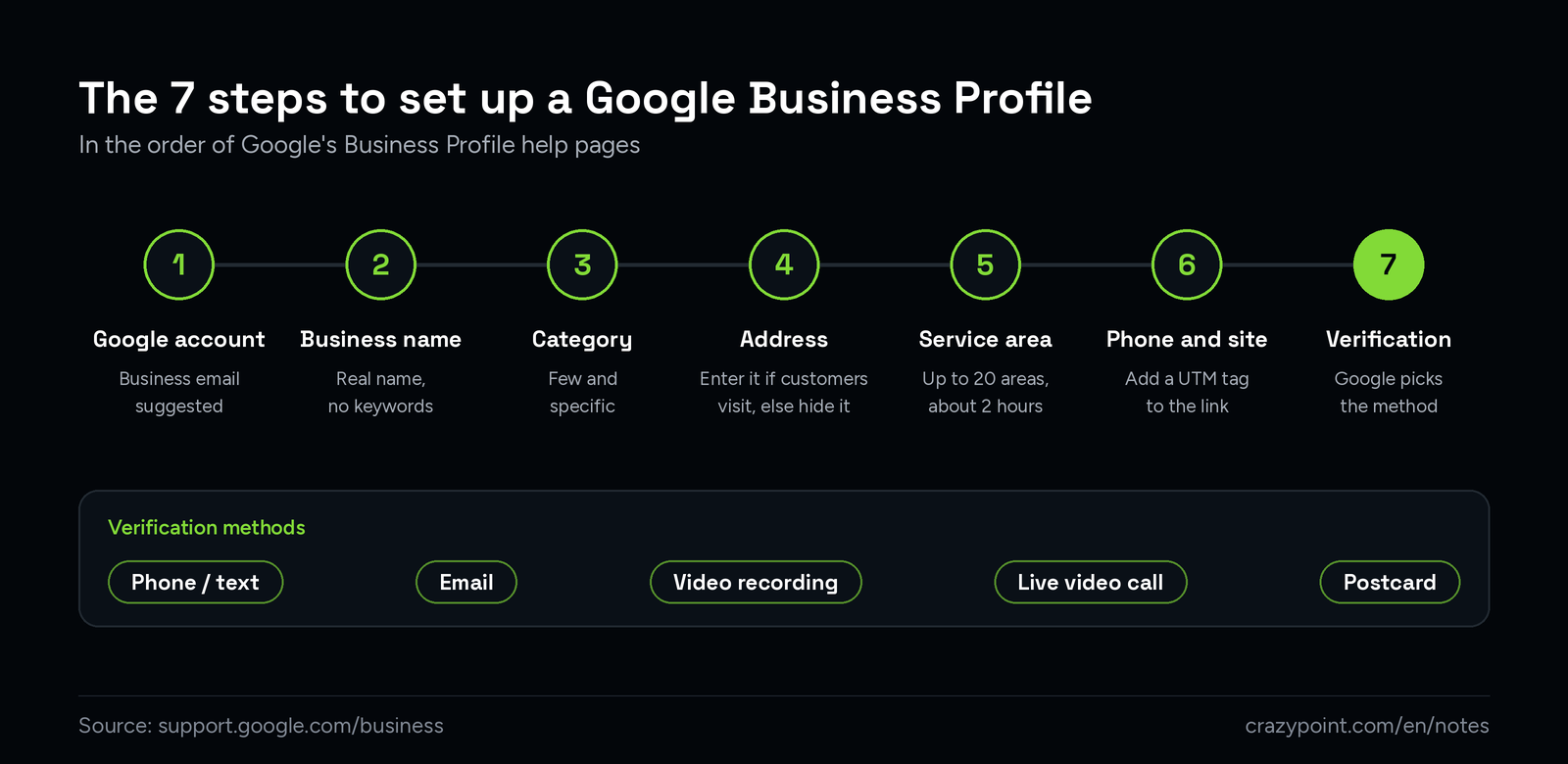
You set up the profile with a Google account. For a new account, Google suggests using your business email. This way, the profile isn’t tied to your personal account.
The name should be the one your business really uses. For example, you write “CrazyPoint”, not “CrazyPoint Ankara Ad Agency”. Under Google’s rules, adding a location or keywords to the name isn’t allowed.
The category says what your business is. However, Google asks you to pick as few categories as you can. They should also be specific. And they should not be used as keywords.
If customers visit your business, you enter the address. If not, the address stays hidden. For example, businesses that visit customers or work online hide it.
You add the cities or regions you serve. You can add up to 20 areas. However, Google suggests they stay within about 2 hours’ drive of your business.
Next, you enter your phone number and website address. Add a UTM tag to the website link. Then you can track visits from the profile.
In the last step, Google verifies your business. Google picks the method based on your business type and region. Unverified profiles don’t show up on the map.
According to Google’s verification page, the methods are:
| Method | How it works |
|---|---|
| Phone or text | You answer the call or enter the code. |
| You follow the steps on screen. | |
| Video recording | You upload a video that shows your business. The review takes up to 5 business days. |
| Live video call | You talk to a support agent. |
| Postcard | You enter the 5-digit code on the card. It usually arrives within 14 days. |
For video verification, Google asks for proof of location, business and management. For example, you can show your sign, your equipment or your shop keys. If the video isn’t accepted, Google sends a notice asking you to review the issues.
5 mistakes that get profiles suspended
Under Google’s rules, you can’t add keywords to the business name. You can’t open a second profile for the same business. You can’t use a virtual office address. You can’t list discounts or offers in the description. You can’t add links to the description either. Profiles that break the rules can be suspended.
Setting up the profile is not enough. That’s because according to Google, three things decide local ranking: relevance, distance and prominence. For relevance, your profile needs to be complete. Prominence, on the other hand, partly depends on your review count and rating.
Be careful when you ask for reviews. Under Google’s content policy, you can’t offer discounts or gifts for reviews. Fake reviews are also removed. So ask only real customers, and offer nothing in return.
A Google Business Profile matters most, but it isn’t the only listing. For example, Bing Places can import your Google profile. Also, independent analyses show that ChatGPT’s map results draw on Bing and other map listings. So once Google verifies you, it helps to open the other listings too.
We are an agency based in Ankara. The Business Profile is part of our local SEO work. The work moves in four steps:
The profile works better together with your website. So we also match the address, phone and services on your site to the profile. The quote states the price based on the scope.
Yes. The profile is free. You only pay if an agency sets it up and manages it for you.
No. If customers don’t visit you, hide the address and choose a service area. But Google may still ask for business details to verify you.
No. Under Google’s rules, the name must be your real business name. Adding a location or keywords can get your profile suspended.
It depends on the method. Phone and email are fast. A video review takes up to 5 business days. A postcard usually arrives within 14 days.
Get your business on the map
Tell us in a few sentences about your business and the area you serve. We will set up your profile and help you show up in local search. For details, see our SEO Services page.


Comments are closed